Send emails via Mailgun
How to get there: Go to Settings in the sidebar → Notifications & email → Email setup → Email Provider section.
This guide explains how you can set up Mailgun emails for ProductLift.
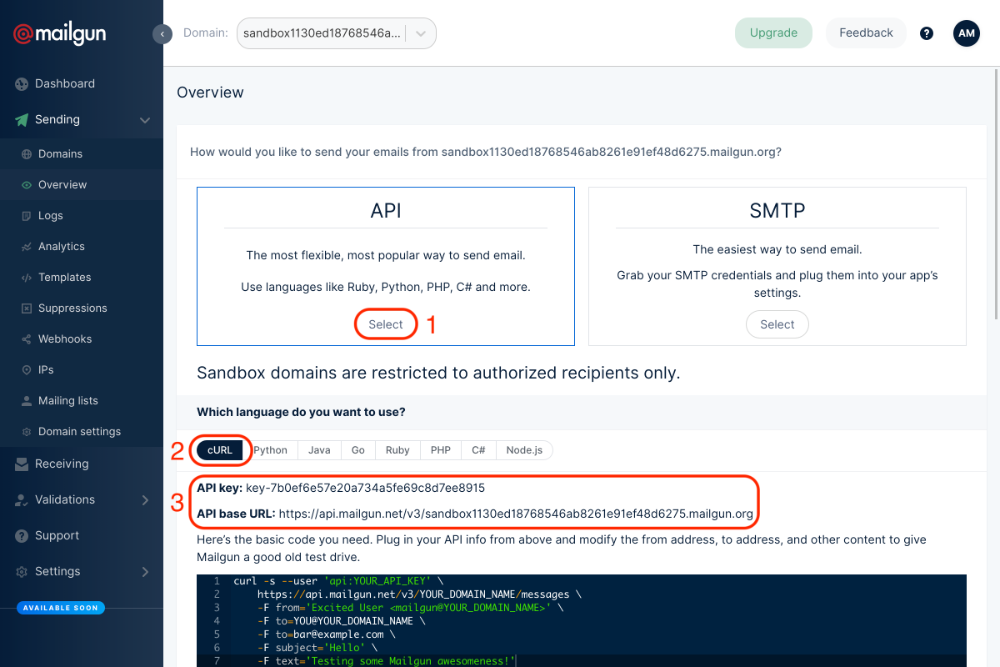
Go to Overview page in your Mailgun dashboard, select the API option, then cURL and take note of the API key and API base URL that are now visible:
Go to your Email settings page in ProductLift, select Mailgun, and fill in the fields:
-
Domain: the exact domain you did the setup for in Mailgun
-
Secret: the API key you copied in the last step
-
Endpoint: the API base URL that you copied in the last step, but without the https:// (e.g. api.mailgun.net)
 Powered by ProductLift