Use advanced filtering and search
How to get there: Click All posts (via a board’s breadcrumb or the sidebar shortcut, when available) → use the filter and search bar at the top of the post list.
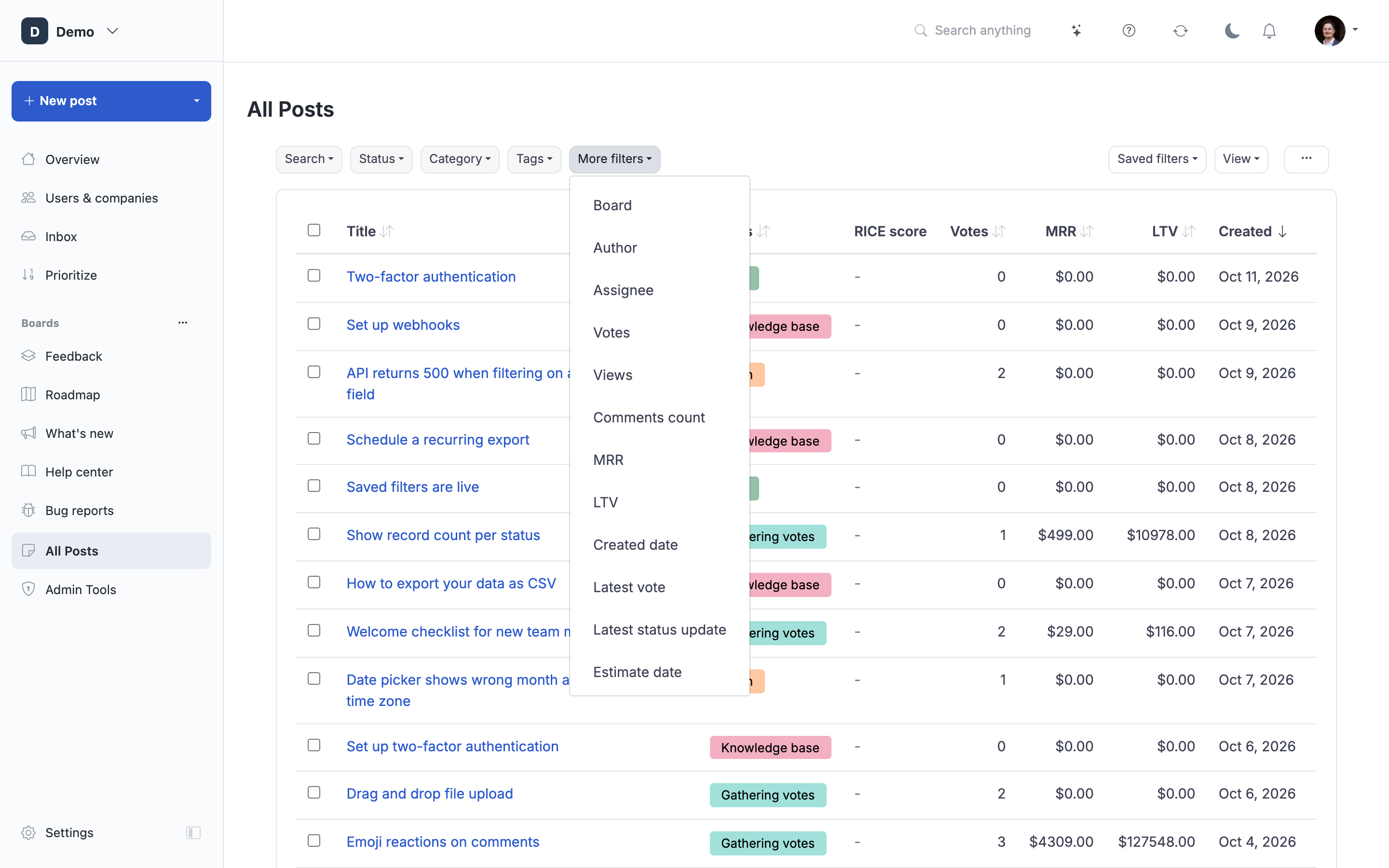
Master ProductLift's powerful filtering and search capabilities to quickly find specific posts, analyze feedback patterns, and manage large volumes of customer feedback efficiently.
Overview of Filtering
ProductLift offers comprehensive filtering across multiple dimensions, allowing you to slice and dice your feedback data to find exactly what you need.
Filter Categories:
- Content filters (status, category, tags)
- User segment filters (MRR, plan type, user status)
- Time filters (date ranges, recent activity)
- Metadata filters (version, platform, assignee)
- Search (keyword and operators)
Accessing Filters
Open Filter Sidebar:
- Navigate to any Feedback Board or board
- Click "Filters" button or icon
- Filter sidebar opens on left or right
[Screenshot: Feedback board with filter sidebar open showing multiple filter sections]
Filter Sidebar Sections:
Organized by category:
- Search
- Status
- Category
- Tags
- User Segments
- Date Range
- Additional Filters (version, platform, etc.)
Content Filters
Status Filter
Filter by workflow status:
- Click "Status" section
- Check statuses to include
- Multiple selection (AND logic)
- Uncheck "All" to select specific statuses
Example Use Cases:
- Show only "Under Review" posts (moderation queue)
- Show "Planned" + "In Progress" (active roadmap)
- Hide "Released" + "Won't Build" (focus on open items)
[Screenshot: Status filter with checkboxes for New, Under Review, Planned, In Progress, Testing, Released, Won't Build]
Category Filter
Filter by product area:
- Click "Category" section
- Check categories to include
- Multiple selection
Example Use Cases:
- Show only "Mobile App" posts
- Show "Integrations" + "API" posts
- Focus prioritization on specific area
Dynamic Category List:
Categories are your custom categories. Examples:
- Mobile App
- Web Application
- Billing & Accounts
- Integrations
- Performance
- Security
[Screenshot: Category filter showing checkboxes for various categories with post counts: Mobile App (47), Integrations (32), etc.]
Tag Filter
Filter by tags:
- Click "Tags" section
- Type tag name (autocomplete helps)
- Add multiple tags
- Choose AND vs. OR logic
AND Logic (All Tags):
- Post must have ALL selected tags
- Narrow results
- Example: "enterprise" AND "security" → Only posts with both tags
OR Logic (Any Tag):
- Post has ANY selected tag
- Broader results
- Example: "ios" OR "android" → Posts with either tag
Tag Filter Examples:
High Priority Posts:
- Tags: "high-priority", "urgent"
- Logic: OR
- Result: Posts marked urgent or high-priority
Enterprise Security:
- Tags: "enterprise", "security"
- Logic: AND
- Result: Enterprise security posts only
[Screenshot: Tag filter input with autocomplete dropdown showing matching tags, AND/OR toggle]
Board Filter
Filter by board (if multi-board portal):
- Show posts from specific board only
- Useful when viewing all posts across boards
- Example: Show only "Roadmap" board posts
User Segment Filters
MRR (Monthly Recurring Revenue) Filter
Filter by customer value:
- Slider or input: Minimum and maximum MRR
- Show posts voted by customers in MRR range
MRR Range Examples:
- High Value: $5,000+ MRR
- Mid-Market: $1,000-$5,000 MRR
- SMB: $100-$1,000 MRR
- Free/Trial: $0 MRR
Use Cases:
- Prioritize enterprise requests: MRR >$5k
- Understand SMB needs: MRR $100-$1k
- Identify high-revenue-impact features
Total Voter MRR:
Option to filter by total MRR of all voters:
- Post must have combined voter MRR in range
- Identifies features with high revenue impact
[Screenshot: MRR filter showing slider from $0 to $10,000+ with selected range $5,000-$10,000]
Plan Type Filter
Filter by subscription tier:
- Checkboxes for each plan type
- Your custom plan names
Example Plan Types:
- Free
- Starter
- Pro
- Business
- Enterprise
Use Cases:
- Enterprise feature requests: Plan = Enterprise
- Free tier feedback: Plan = Free
- Understand needs by customer segment
[Screenshot: Plan type filter with checkboxes for Free, Starter, Pro, Enterprise]
User Status Filter
Filter by account status:
- Active
- Trial
- Churned
- Suspended
Use Cases:
- Trial user needs: Status = Trial (conversion optimization)
- Churn prevention: Status = Churned (understand why they left)
- Active customer priorities: Status = Active
Custom Segment Filter
Your defined segments:
If you've created custom segments:
- Segment name appears in filters
- Check segment to filter
- Example: "High-Value At-Risk" segment
Time Filters
Date Range Filter
Filter by submission date:
Predefined Ranges:
- Today
- Last 7 days
- Last 30 days
- Last 90 days
- This month
- This quarter
- This year
Custom Range:
- Start date picker
- End date picker
- Apply custom range
Use Cases:
- Recent submissions: Last 7 days
- Quarterly review: This quarter
- Aging feedback: Older than 6 months (custom)
[Screenshot: Date range filter showing predefined options and custom date pickers]
Last Updated Filter
Filter by recent activity:
- Posts with recent comments
- Posts with recent votes
- Posts with recent status changes
Options:
- Updated today
- Updated this week
- Updated this month
Use Case:
Find active discussions: Updated this week
Voted Date Filter
Filter by when votes were cast:
- Recent voting activity
- Trending posts (votes in last X days)
Metadata Filters
Version Filter
Filter by product version:
If posts tagged with versions:
- Select version(s)
- See feedback for specific releases
Example:
- v2.4 bug reports
- v2.5 feature requests
Platform Filter
Filter by platform/device:
- Web
- iOS
- Android
- Desktop
- API
Use Cases:
- Mobile team: Platform = iOS or Android
- Web team: Platform = Web
- Cross-platform issues
[Screenshot: Platform filter with checkboxes for Web, iOS, Android, Desktop]
Release Filter
Filter by target release:
If using release tags:
- Filter posts planned for specific release
- Example: "Q3 2026 Release"
Assigned To Filter
Filter by team member:
- Dropdown of team members
- Show posts assigned to specific person
- "Unassigned" option
Use Cases:
- My tasks: Assigned to = Me
- Team member workload: Assigned to = John
- Unassigned posts: Assigned to = None
Search
Keyword Search
Search post titles and descriptions:
- Search box at top of filters
- Type keywords
- Results update in real-time
What's Searched:
- Post titles
- Post descriptions
- Comments (optional setting)
- Tags (automatic)
Example Searches:
- "dark mode" → Posts mentioning dark mode
- "SSO" → Single sign-on related posts
- "mobile app crash" → Specific issue search
[Screenshot: Search box with keyword "dark mode", showing real-time filtered results]
Search Operators
Advanced search syntax:
Exact Phrase:
"dark mode"Finds exact phrase (with quotes)
Exclude Terms:
integration -slackFinds "integration" but excludes posts with "slack"
Multiple Terms (OR):
mobile iOS androidFinds posts with any of these terms
Multiple Terms (AND):
+mobile +dark +modeFinds posts with all terms (use +)
Wildcard:
integrat*Finds integration, integrations, integrate, etc.
Examples:
"Exact phrase search":
"user authentication"Only posts with exact phrase
Complex query:
+mobile +"dark mode" -iosMobile posts with "dark mode" but not iOS-specific
Search Tips
Be Specific:
- Vague: "feature"
- Specific: "export to Excel"
Use Quotes for Phrases:
- Without quotes: "dark mode" → finds "dark" OR "mode"
- With quotes: "dark mode" → finds exact phrase
Combine with Filters:
- Search: "integration"
- Filter: Category = Integrations, Status = Planned
- Result: Planned integration posts matching search
Combining Multiple Filters
Filter Logic
Multiple Filters AND Together:
When you apply multiple filters, they combine with AND logic:
Example:
- Category: Mobile App
- Status: Under Review
- MRR: >$5,000
Result: Posts that are:
- IN Mobile App category
- AND have Under Review status
- AND voted by customers with >$5k MRR
All conditions must be true.
Complex Filter Combinations
Example: High-Value Quick Wins
Filters:
- Status: Under Review
- Votes: >20
- Tags: "quick-win"
- MRR: >$2,000 (total voter MRR)
- Date: Last 90 days
Result: Recent, highly-voted, quick-win posts from valuable customers.
Example: Trial User Conversion Blockers
Filters:
- User Status: Trial
- Tags: "blocker"
- Status: New, Under Review
- Date: Last 30 days
Result: Recent blockers preventing trial conversions.
Clearing and Resetting Filters
Clear Individual Filter
Remove single filter:
- Click "X" next to filter in sidebar
- Or uncheck option in filter section
- Results update immediately
Clear All Filters
Reset to unfiltered view:
- Click "Clear All Filters" button
- All filters removed
- Shows all posts
[Screenshot: "Clear All Filters" button at top of filter sidebar]
Active Filters Indicator
See applied filters at a glance:
- Filter summary bar above posts
- Shows: "5 filters applied"
- Click to expand and see details
- Quick access to remove specific filters
[Screenshot: Active filters bar showing "Category: Mobile App, Status: Under Review, MRR: $5k+, 47 results" with X buttons to remove]
Saving Filter Combinations
Save as Query
Complex filter combinations can be saved:
- Apply filters
- Click "Save Query"
- Name your query
- Reuse with one click
See Saved Queries and Filters for details.
Filter Performance Tips
Faster Filtering
Quick Filters:
- Status (indexed)
- Category (indexed)
- Tags (indexed)
Slower Filters:
- Complex searches
- Custom field filters
- Very old date ranges
Optimize Large Datasets
When filtering 1000+ posts:
- Start with restrictive filters (status, category)
- Add additional filters progressively
- Use saved queries for frequent complex filters
Filter Use Cases by Role
Product Manager
Weekly Review:
- Status: New, Under Review
- Date: Last 7 days
- Purpose: Weekly moderation/triage
Quarterly Planning:
- Status: Under Review
- Votes: >10
- MRR: >$1,000
- Purpose: Prioritization candidates
Customer Success
Churn Risk:
- Custom Segment: Churn Risk
- Status: Not Released
- Purpose: Features to retain at-risk customers
Trial Conversion:
- User Status: Trial
- Tags: "blocker"
- Purpose: Remove conversion barriers
Sales
Enterprise Pipeline:
- Plan Type: Enterprise (prospects)
- Tags: "deal-blocker"
- Purpose: Close deals faster
Engineering
My Work:
- Assigned To: Me
- Status: Planned, In Progress
- Purpose: Daily task list
Technical Debt:
- Tags: "technical-debt"
- Purpose: Quarterly tech debt review
Troubleshooting
Issue: Filter Returns No Results
Solution:
- Too many filters (try removing some)
- No posts match criteria (verify filters make sense)
- Check date range (too narrow?)
- Clear all and start over
Issue: Too Many Results
Solution:
- Add more filters to narrow
- Use MRR or vote threshold
- Add date range
- Use search keywords
Issue: Filter Seems Broken
Solution:
- Clear browser cache
- Refresh page
- Verify filter logic (AND vs. OR for tags)
- Check for conflicting filters
Issue: Slow Filter Performance
Solution:
- Simplify complex filters
- Use more restrictive filters first
- Contact support if persistent
Related Articles
Filtering Tools:
- Saved Queries and Filters - Save filter combinations
- Filter posts by custom field values - Filter by per-post-type custom fields
- Saved column views - Save column layouts for different roles
- User Segments - Create custom segments for filtering
Workflows:
- Analyzing User Feedback Data - Using filters for analysis
- Complete Feedback Workflow - Filters in feedback management
Operations:
- Bulk Post Operations - Apply bulk actions to filtered results
- Post Moderation - Filter moderation queue