Set up languages and AI translations
How to get there: Open Settings → Languages & translations → Languages.
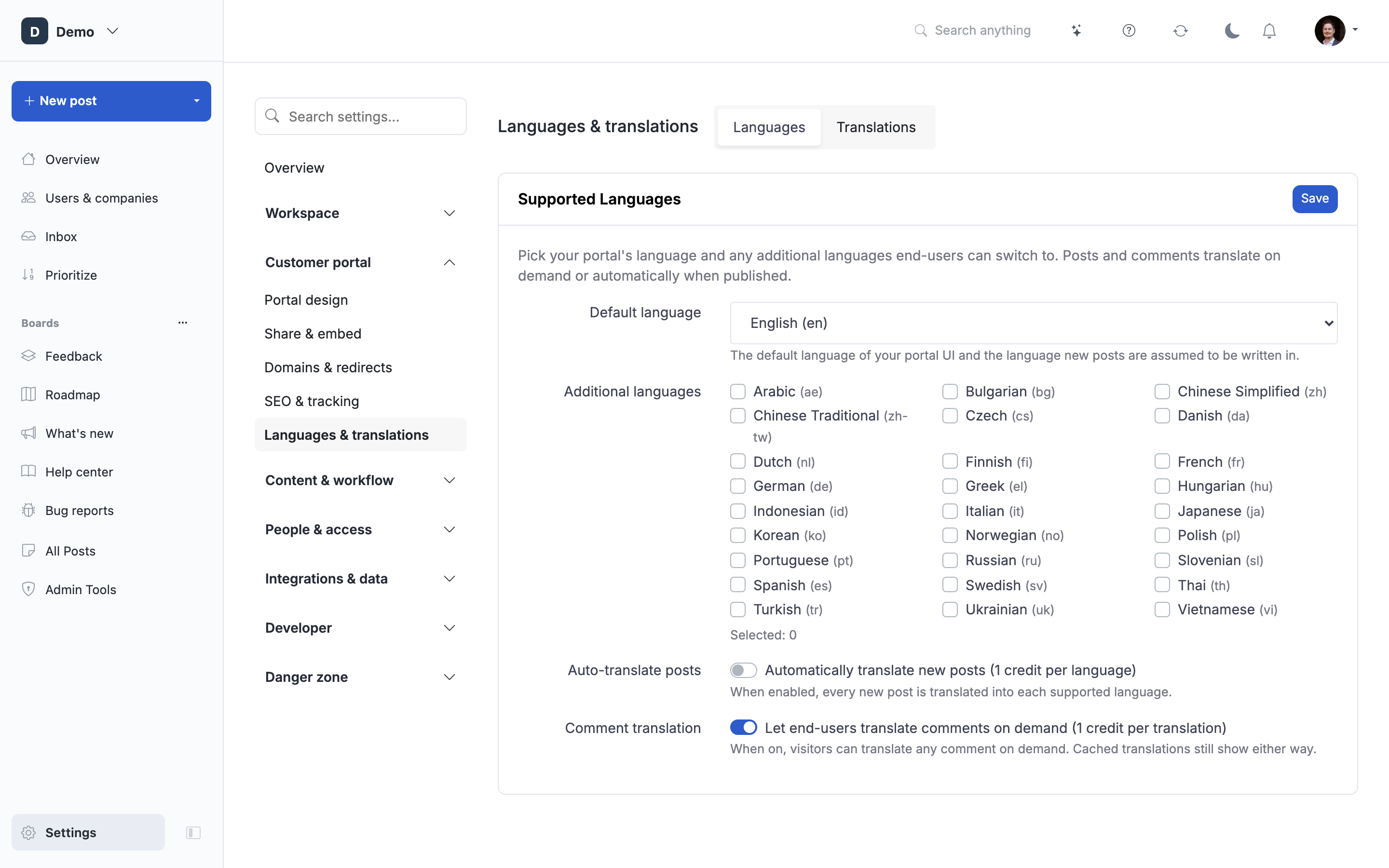
ProductLift is built around a single-source, multi-target translation model. You pick one source language for the portal, add the extra languages you want to support, and the system uses AI to translate posts, comments, and admin labels into those extra languages on demand.
This article explains where the source language comes from, how ProductLift decides which language to show each visitor, how AI translations are generated and cached, and how teams can work with translated content without stepping on each other.
The source language versus supported languages
Every portal has two related settings:
- Source language (
localization): the one language every post, comment, and admin label is originally written in. This is set when the portal is created (usuallyen) and is treated as the source of truth for all translations. - Supported languages (
supported_languages): the extra languages you want to make available to end-users. Selected on the Languages tab. These are the targets AI translations get generated for.
Translations are always derived from the source. When you edit a post in the source language, ProductLift automatically queues a re-translation for every supported language so end-users are not left reading a stale AI translation of an old version. In the meantime, the outdated fields are blanked so visitors see the fresh source-language text via the normal fallback rather than a mismatched translation. There is no "primary language per post" concept; the portal-wide source language always wins.
How ProductLift picks the language to show a visitor
The Localization middleware runs on every portal page load and resolves the visitor's locale in this order:
?lang=xxURL parameter. If the code is one of your supported languages, it wins for this and all future requests (stored in alangcookie for one year). If the visitor is logged in, their profilelanguageis also updated. If the code is not one of your supported languages, the parameter is silently ignored and no cookie is written, so visitors cannot force the portal UI into a language you never enabled by sneaking?lang=into the URL.langcookie. Set by a previous URL parameter, by a manual language switch in the portal UI, or mirrored from the authenticated user's profile language.- Browser
Accept-Languageheader. Honored only if the language is in your portal's Supported Languages list. This prevents a Spanish-only portal from unexpectedly serving Chinese UI just because a visitor's browser prefers it. - Portal source language (
localization). - App default (
en). Only reached on pages that run outside a portal context.
For logged-in users, their saved language column also gets mirrored to a lang cookie on their next request, so the switch persists across devices when they sign in.
Changing the default language later
The default language can be changed on Settings → Languages & translations → Languages even after posts and translations exist. When you switch it, ProductLift protects your existing work in two ways:
- Admin labels are swapped, not lost. Any tab, status, category, section, post type, or custom field that already has a complete translation to the new language has that translation promoted into the source columns. The previous source text is preserved as a translation under the old language, so nothing is deleted.
- The old language is auto-added to Supported Languages. This ensures the preserved translations remain visible to end-users who were reading the portal in the old default.
Admin labels that were not translated to the new language are left as-is, so the source columns keep their old value. Fill in the missing translations before switching if you want a clean cut-over.
Posts and comments are not swapped. Only admin labels get the swap treatment. Post content continues to live under whatever language it was originally written in. Use "Retranslate all" on individual posts (or bulk translate on the Languages tab) to bring posts in line with the new default.
Enable supported languages
On Settings → Languages & translations → Languages, tick the languages you want to offer. The source language is always available and is not shown in the checklist. Save.
Two things happen once a supported language is enabled:
- End-users get a language picker in the portal (or can arrive via
?lang=xx). - Admin labels for statuses, post types, custom fields, tabs, sections, and categories become translatable in that language.
Removing a language later does not delete existing translations. The data stays in the database in case you re-enable the language.
Translate admin labels
Below the language checklist you will see a table of admin-defined labels (status names, tab names, custom field labels, category names, etc.) with a column per supported language.
You have two options for each label:
- Type the translation manually. No AI credits used. Use this when the correct wording matters (product names, legal wording, marketing copy).
- Bulk translate with AI. One click per language translates every missing admin label at once. Costs 1 AI credit per language regardless of how many labels are filled in.
Manual edits are never overwritten by the bulk button; it only fills in fields that are still empty.
Translate posts and comments
There are three ways post content becomes multilingual:
1. Auto-translate on publish (recommended for high-volume portals)
Turn on Auto-translate posts on the Languages tab. Every new post is queued for AI translation into every supported language right after it is created. Cost: 1 AI credit per post per supported language. For example, three supported languages means 3 credits per new post.
If the portal runs out of credits, in-flight translation jobs stop cleanly; no partial translations get saved and the post stays visible in the source language. A portal-wide amber "Translations paused" banner then appears at the top of every admin page with an Add credits button. As soon as credits are topped up, auto-translation resumes and the banner disappears on the next request. Existing (previously-generated) translations continue to serve normally while paused; only new translation work is held back.
2. Refresh posts, labels, or everything
The Languages tab has three refresh cards:
- Refresh posts: queues every post whose translation is missing or out of date. Cost: 1 credit per post per language. The card shows a live count of outdated (missing + stale) translations so you can estimate the spend before clicking.
- Refresh labels: queues admin-defined labels (statuses, categories, tabs, sections, post types, custom fields) that are missing a translation in one of your supported languages. Cost: 1 credit per language, regardless of how many labels are refilled.
- Refresh everything (stale): a single button that combines the two above and covers anything the two-per-surface sweeps missed. Use this when you've just enabled a new language, imported a batch of posts, or want a one-click "make my portal fully translated" pass.
For posts, "outdated" means one of:
- Missing — the post was created before the language was enabled, or auto-translate was off at the time.
- Stale — the source text was edited after the translation was generated, so the stored translation no longer matches.
- Legacy — the post was bulk-translated before ProductLift started stamping source hashes, so it cannot be verified as fresh.
Manual translations are treated as fresh and are not touched by any of the three sweeps.
3. On-demand comment translation
Comments are translated when a viewer clicks the "translate" link on the comment itself. Cost: 1 credit per (comment, language). Subsequent viewers in the same language get the cached translation for free. This keeps comment threads cheap on portals where only a handful of comments actually need cross-language reading.
Post translations use the same caching approach: once translated for a given language, they are stored on the post itself and served instantly on later visits.
Exception: comments tagged for the changelog. A comment you mark Tag for changelog stops being a normal thread reply and starts rendering as the post's description on the public changelog. Because the changelog is a browsing surface (not a click-to-translate surface), those tagged comments are auto-translated up-front like posts. Cost: 1 credit per supported language, once when the tag is applied and again if the comment body is later edited. Regular thread replies remain on the on-demand path above.
Keeping translations in sync when the source changes
When an admin edits a post's title, description, or excerpt in the source language, ProductLift does two things immediately:
- Marks the affected translations as out-of-date by re-stamping the source hash on the post. The stored per-language hashes no longer match, so the read-time serving gate refuses to serve the stale translation and end-users viewing a translated language see the fresh source text via the fallback (instead of a translation of yesterday's content).
- Queues a background re-translation job for every supported language, costing 1 AI credit per language, so the translated versions catch up within a minute or two.
Admin labels behave the same way. Editing the English name of a tab, status, category, section, post type, or custom field marks every non-manual translation as out-of-date so end-users immediately see the fresh source-language fallback. When Auto-translate posts is on, a background job also refills the outdated labels within a minute or two, batched across every label that changed for that portal (cost: 1 AI credit per language, not per label).
Manual edits are preserved. If someone on your team hand-edited the German version of a post or a label, that entry keeps its content and is not blanked or re-translated automatically. It stays flagged so you know the source has since changed.
The banner on Post Detail. When you open a post as an admin and any locale is stale, missing, or hand-edited, a "Translations out of date" banner appears above the post with per-locale status badges (fresh / stale / missing / manual). Two buttons:
- Retranslate stale re-runs AI translation for the outdated locales only, skipping manual entries.
- Retranslate all additionally overwrites hand-edited translations with a fresh AI version. Use this when you have significantly rewritten the source and the old manual translation no longer fits.
Both actions honour the portal's AI credit balance and skip locales that are already fresh, so double-clicking or re-editing the same post repeatedly is safe and cheap.
Updates via the API always re-translate. Bot-driven post updates (for example a nightly GitHub Actions job that refreshes a download link) automatically trigger the same re-translation flow, because API callers cannot see the banner. If you rely on manual translations, expect API updates to override them; use the labels editor for content that must not be touched by AI.
AI answers in the knowledge base
If you use the knowledge base AI chat, its behavior is different from post translation. The AI reads all your KB articles in their stored (source-language) form, then answers in the language the visitor is currently viewing the portal in. Answers are generated fresh each time and are not cached. Cost: 1 credit per question answered.
Practical consequence: you do not need to translate every KB article for the AI chat to answer questions in French, German, etc. The AI translates the answer at generation time. Human visitors browsing the article pages directly, though, will see the article in the source language unless you translate the underlying post.
AI auto-reply, moderation, and generation
- Auto-reply on new posts replies in the language of the post (which is your portal's source language).
- AI moderation can detect non-source-language posts and flag them if you have "decline posts not in {language}" in your moderation instructions.
- AI post generation (bulk-create posts as an admin) takes an explicit
languageparameter and generates directly in that language. It does not go through the translation cache. - AI changelog summarization produces its output in the source language. Translate the resulting changelog post afterwards if you need it in other languages.
Email notifications
When the system sends a notification email (comment reply, follower update, status change), it picks the language in this order:
- The recipient's saved profile
language, if that language is either your source language or in Supported Languages. - The portal source language.
This means every user gets emails in a predictable language they have opted into, and enabling more Supported Languages is what unlocks more choices for your users' profiles. It also means that if a user's profile is set to a language you have since removed from Supported Languages, they fall back to the source language on their next email.
SSO: passing a language from your app
If you use SSO, your JWT payload can include an optional language field, for example "language": "fr". When ProductLift decodes the token it validates the code against the enabled locales and, if valid, sets user.language for that user. This skips the visitor's "pick a language" step entirely.
The value must be a locale enabled on your portal (either the source language or one of the Supported Languages). Invalid values are ignored silently rather than throwing an error, so a typo in your integration will not break sign-in.
See Single sign-on for the full JWT contract.
AI credit costs at a glance
| Action | Cost |
|---|---|
| Bulk translate admin labels | 1 credit per language |
| Manual edit of an admin label | Free |
| Auto-translate a new post | 1 credit per supported language |
| Bulk translate existing posts | 1 credit per post per language |
| Translate a comment on demand | 1 credit per language (cached after first) |
| Auto-translate a changelog-tagged comment | 1 credit per supported language (on tag and on edit) |
| KB AI answer | 1 credit per question |
| AI post generation | 1 credit per generation run |
See AI credits for how credits are allocated and top-ups.
Working with translated content as a team
A few practices that keep multilingual portals sane:
Edit in the source language, not in the translation. If you fix a typo directly in the German version of a post, the source (English) still has the typo, and any future re-translation will re-introduce the German typo. Instead: fix the source, then re-run translation for that post.
Trust the automatic re-translation, review with the banner. Source edits trigger a re-translation automatically and blank the stale content in the meantime, so end-users never see the old version. Use the "Translations out of date" banner on the post to double-check the per-locale status and force a re-run if the queue is backed up.
Do not toggle Supported Languages casually. Adding a language triggers a queue of translation jobs the moment auto-translate is on. Removing a language does not delete the translation data, but end-users lose the picker entry until you re-enable it. Coordinate this with whoever manages your AI credit budget.
Split "polish" work by language. AI translation is a solid first draft, not a final copy. If someone on the team is a native speaker of a supported language, have them sweep the highest-traffic posts and admin labels in that language manually. Manual edits are preserved when future bulk-translate runs happen.
Budget for new posts, not the back catalog. After the initial bulk translate, ongoing cost is bounded by post creation volume. Ten new posts per week in a portal with three supported languages costs about 30 credits per week, plus whatever comment translations get requested.
Watch the auto-translate toggle after enabling a new language. The first time you tick a new Supported Language, run bulk translate deliberately so you can review the credit spend up front, then flip auto-translate back on for the ongoing flow.
Coach admins on the source-of-truth rule. New team members often try to "just quickly edit the French version" of a post. Make sure they know the source language is the canonical one and that AI-generated translations are cache entries, not independent content.
What ProductLift does not do
- No per-post source language. All posts in a portal share the same source language.
- No content-level fallback chains. If a language is enabled but a specific post has no translation for it, end-users see the source language for that post.
- No translation of user-uploaded attachments, images, or embedded videos.
- No translation of comment content authored in a different language than the source. AI moderation can flag such comments if you configure it to; translation is still on-demand per viewer.
- No admin UI translations. The admin dashboard itself is English-only; only end-user-facing content follows this system.
Related articles
- Supported languages, the full list of the 28 UI languages ProductLift ships with
- Configure general portal settings
- AI features overview
- AI credits
- Single sign-on
 Powered by ProductLift